
 Daniel J Sait
Can Lenbrook’s new installer utility take the pain and errors out of commissioning large BluOS multiroom audio installations? Richard Stevenson opens the toolkit.
Configuring a single BluOS player isn’t exactly arduous. Give it a network connection, a couple of minutes and you’re away. Configuring up to 64 of them, however, can quickly become an exercise in repetitive strain injury, leaving you questioning why you convinced the client they needed that many zones of music. This is precisely the problem the new BluOS Configuration Utility sets out to solve, while also adding a range of installer-focused features. As residential audio continues to move away from centralised rack-based matrix systems towards networked streaming endpoints distributed throughout the home, tools like this become increasingly relevant.
Rather than introducing another control app or trying to reinvent the BluOS wheel with fancier graphics, the utility focuses on reducing the time it takes to commission, configure and maintain larger BluOS installations. Having spent time walking through the software with NAD CI Product & Channel Development Manager Peter Gibb, it quickly becomes apparent this is a slick workflow tool designed by people who clearly understand the realities of life on site.
As streaming hardware has become increasingly capable and affordable, the challenge for brands like NAD is no longer simply building another high-resolution streamer for the CI market. The real opportunity lies in adding value to the installation by making installers’ lives easier through the overall product ecosystem.
Rather than adding features for their own sake, the utility has been designed to tackle the everyday frustrations installers experience when deploying multiple players. Naming and configuring dozens of devices, managing firmware updates one player at a time, assigning static IP addresses and copying presets individually is not high on anyone’s list of enjoyable tasks. The potential for finger errors is considerable and returning to site months later to work out which accidentally unlabelled player is feeding the snug rather than the cinema is even less fun.
Available for Windows and macOS, the BluOS Configuration Utility is exclusively available to authorised BluOS partners. Access is via a secure login with two-factor authentication and is managed through the local Bluesound or NAD CI distributor following a short training session. The intention is to keep it an exclusive tool for installers working regularly with BluOS. Many of its functions are deliberately absent from the standard BluOS Controller app, as exposing advanced network and configuration tools to end users could easily create more support calls than solutions.
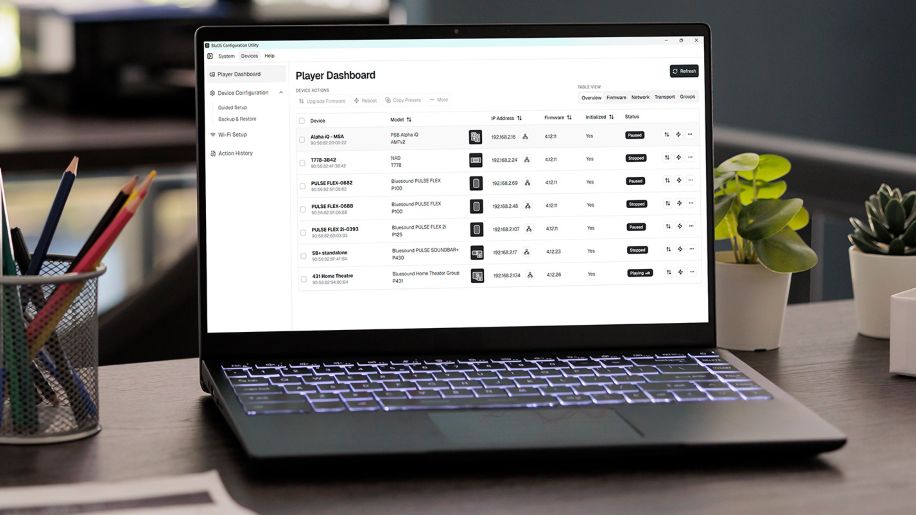
The interface itself is refreshingly straightforward. If you’ve used BluOS before, very little feels unfamiliar. Device discovery happens automatically using the same network protocols as the BluOS app, presenting every player currently visible on the network within a clean dashboard. Testing this on our recently reviewed SA2-120 unit, the utility immediately detected two configured players. Plug in additional units and they simply appear in the list.
Configure, Copy and Paste
Instead of commissioning each player individually through the BluOS app, installers can bulk-configure multiple devices simultaneously, initialising players, managing firmware, applying network settings and preparing the entire ecosystem within a single workflow. Wi-Fi credentials can be deployed across multiple devices at once, players batch renamed, firmware updates launched together and static IP addresses configured without resorting to browser commands or hidden URLs.
Firmware updates can also be disabled once commissioning is complete, allowing installers to manage future updates during scheduled maintenance visits rather than receiving the inevitable phone call beginning, “Something updated and now nothing works…”
The BluOS app has always provided excellent Wi-Fi signal strength and LAN diagnostics, and the Configuration Utility follows suit by presenting detailed network information. Being able to immediately identify whether a player is connected via Ethernet or Wi-Fi, together with signal strength, is invaluable when tracking down intermittent network issues without diving through multiple interfaces.
Interestingly, some of the utility’s biggest time savers aren’t the headline features. Copying presets sounds almost trivial until you’re commissioning 20 rooms, each requiring several identical favourite radio stations, multiple streaming services and numerous playlists. Instead of recreating those presets repeatedly, installers simply configure one player and copy the entire preset configuration across the rest of the system.
Similarly, backup and restore functionality captures core configuration settings, allowing failed devices to be replaced without restarting the commissioning process from scratch. PDF installation reports and downloadable diagnostic logs also provide valuable documentation for ongoing system support.
By far my favourite feature, however, is Identify Device. For anyone whose rack labelling is less than fastidious, selecting a player flashes its front-panel LED while simultaneously playing a test tone through the connected speakers.
On a simple three-room retrofit, configuring three zones via the BluOS app is hardly difficult, but even here the batch application of settings neatly avoids the simple typos and brain-fade moments that inevitably creep in. Scale that up to a dozen zones in a large home or 40 zones in a commercial installation, and the time savings — and reduction in avoidable mistakes — become very significant.
Exclusive New Features
While the Configuration Utility isn’t trying to compete with the backend of a dedicated control system, it already introduces some useful automation features. The utility unlocks configurable audio notifications and trigger-based actions, allowing installers to upload custom audio files directly to compatible BluOS devices.
All BluOS devices now support uploaded voice announcements triggered via APIs, while several NAD CI products, including the SA2-120, feature configurable 12V input triggers. These can be used to trigger announcements, mute audio during alarms, switch sources or launch presets via hardware inputs.
Although this isn’t intended to replace full automation platforms such as Control4 or Crestron, it recognises the growing demand for smart home integration by providing a lightweight solution for BluOS devices. For more modest projects, simpler decentralised systems that minimise complexity while retaining the integration touches clients appreciate help justify professional installation without dramatically increasing costs.
Evolution
Where things become particularly interesting is that the BluOS Configuration Utility is already evolving beyond a commissioning tool into a genuine maintenance platform. Although remote cloud management isn’t currently available, the software already includes sufficient diagnostic information to support ongoing servicing. Installers offering annual maintenance contracts can already centralise firmware management, diagnostics and configuration backups by running the utility on an on-site headless NUC or PC accessed remotely via VPN.
Configuration utilities rarely steal the limelight, and nobody chooses a multiroom platform because of its commissioning software. Yet after spending time with the BluOS Configuration Utility, it’s easy to see that going back to configuring dozens of network players individually would feel decidedly old-fashioned, particularly when the inevitable configuration typo creeps in.
Perhaps the biggest take-away isn’t any single feature. As streaming hardware becomes increasingly commoditised, manufacturers are beginning to compete just as hard on the installer experience as they do on audio performance. The BluOS Configuration Utility demonstrates that NAD and Bluesound understand that shift. It won’t install speakers, terminate Cat6 cables or persuade interior designers that speakers really do need to exist, but it quietly removes hours of repetitive commissioning work while introducing genuinely valuable maintenance and diagnostic tools to the BluOS ecosystem.