
 Lewis Caliburn
D-Tools has announced D-Tools Cloud Release #100, delivering 66 improvements, which is more new capabilities than any release since the platform’s 2018 debut – spanning payments, sales reporting, inventory and project drawings. Many of the improvements came directly from customer requests, and together are designed to make D-Tools Cloud faster, clearer and more complete at every stage of the integration business lifecycle.
“This release ships more meaningful new functionality than at any other point in our history,” says G Paul Hess, CEO of D-Tools. “It’s a clear marker of our commitment to elevate D-Tools Cloud from a set of point tools into the one platform that supports every part of running an integration business, from the first sales conversation through design, fulfillment, service and cash flow.”
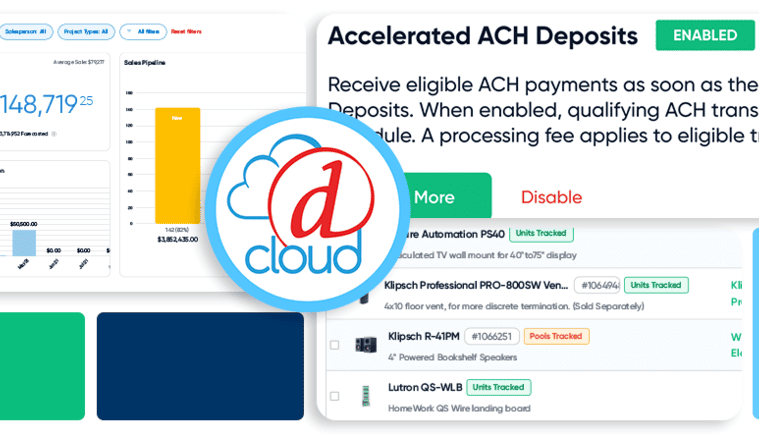
Cash flow is the lifeblood of a small business. Even profitable integrators can struggle when cash isn’t on hand as bills come due. Release #100 attacks that problem directly with Accelerated ACH Deposits, a new next-day funding option in D-Tools Payments. Once enabled and a client’s ACH payment is verified, funds arrive in one business day instead of four, closing the gap with credit card settlement speed. This is a global setting that includes confirmation dialogs and invoice status badges, and it carries a processing fee of 0.8%.
Release #100 also sharpens invoicing clarity. Paid invoices now show clients their own payment-method details, while invoice summaries have been redesigned across digital and PDF formats to clearly break out totals, payments, fees, refunds and balance due. A new QuickBooks Online and Xero filter shows at a glance which invoices have been pushed to accounting and which still need to be linked, across Purchase Orders, Change Orders and Billing, reducing the risk of duplicate or untracked entries.
Release #100 improves sales reporting for better visibility. Opportunities now display an overall total, the Opportunity Dashboard includes subscriptions and the “won” flow accounts for service contracts and subscriptions alongside one-time project revenue.
The Sales Results module receives the largest set of upgrades. A new default “Total” revenue view that combines project, service contract, subscription and service call revenue without double-counting; new date-range presets; a cleaned-up Lost Opportunities gadget; and a new drill-down Details view exposing the underlying opportunities, service calls and change orders behind any number. Sales Forecast receives parallel improvements, including clearer labels, an improved 12-month projection window, corrected tooltips and subscriptions now folded into forecast totals.
Not every stocked product warrants an individual serial number and QR label. Hybrid Inventory gives integrators accurate tracking without over-managing low-value stock, letting them mix Units tracking (individual asset records) and Pools tracking (quantity only) at the individual product level instead of forcing an all-or-nothing choice across the catalogue. Hybrid Inventory builds on Inventory Asset Management (IAM), the award-winning per-unit tracking solution D-Tools Cloud launched earlier this year.
A new Product Tracking Mode lives on the product itself and can be switched individually or in bulk, with a change-guard dialog that protects data integrity by blocking any mode switch while a product has assets or quantities allocated, checked out, or reserved and explaining why. Nearly every inventory workflow now handles both modes side by side, including checkout, check-in, stock transfers, quantity adjustments, service-call allocation, bulk updates and project-item reservation, with colour-coded pills marking the distinction at a glance. CSV import and export support mixed catalogues in a single file.
Release #100 makes the Interconnect Diagrams module, launched last autumn, more branded, flexible and production-ready for client-facing documentation. A new customisable Cover Page provides a reusable, editable first page for project documentation; the Title Block Editor gains a dedicated canvas toolbar and a new Title Block Manager centralises creating, editing, sharing, and defaulting title blocks account-wide.
Users can now create multiple distinct wired connections between the same two devices. A new Connection View scopes a diagram to specific systems and locations for focused AV and network documentation. Diagram exports now use a standardised filename format across PDF and PNG and proposals can open Plan View diagrams with the correct title block already applied, directly from quote and opportunity attachments. This tightens the link between design work and the proposal a client actually sees.
Alongside Release #100, D-Tools has launched a public status page at status.d-tools.cloud, giving customers real-time visibility into the health of D-Tools Cloud applications, APIs, integrations and document services. The page displays live operational status for each core service area, 90-day uptime history and a full incident and maintenance log.
Customers can subscribe to receive notifications via email, SMS, Slack, or Microsoft Teams the moment an incident is created, updated, or resolved.
D-Tools Cloud Release #100 is available now to all D-Tools Cloud subscribers.